
Getting Started with DX Information and Mapping
When you first run DXView, a small window will appear that lets you specify the location of your station (QTH); you can type in either a Maidenhead Gridsquare, or a latitude (e.g. 37 22' N) and longitude (e.g. 121 48' W) .
With your station location defined, you can now obtain DX Information from several sources:
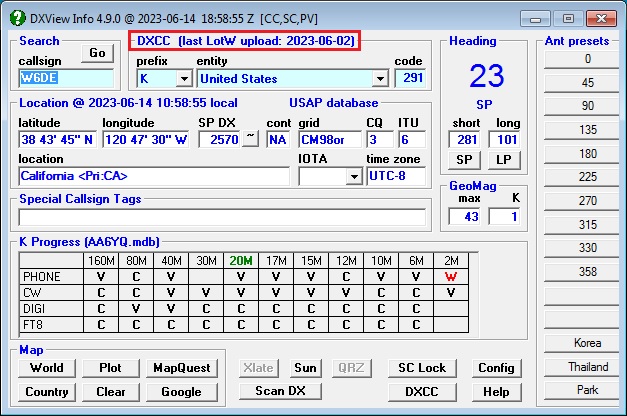
Each of the above actions selects a location whose information is displayed on both DXView's Info and World Map windows; in the latter, the signal path from your QTH to the selected location is also displayed. You can obtain additional information about that location by
clicking the Country Map button (if enabled) to see a more detailed map of the location's DXCC entity
clicking the Google button to see a satellite photo of the location
clicking the MapQuest button to see a map and obtain driving directions to the location
clicking the Sun button to see sunrise and sunset times for the location and your QTH for the next 30 days
Databases
DXView displays information extracted from ten databases:
- DXCC: maps callsigns to DXCC entities and regions within DXCC entities, and provides time zone, CQ zone, ITU zone, IOTA tag, continent, and location information
eQSL AG: indicates whether or not a callsign is known to be an authenticity-guaranteed participant in eQSL.cc
- GridDXCC: identifies the DXCC entities present in each grid square that contains part of a DXCC entity. It also identifies Australian States, Canadian Provinces, Japanese Prefectures, US States, and New Zealand call areas contained in a grid square that contains their parent DXCC entity.
- IOTA: provides the name and location of each IOTA tag
LotW: indicates whether or not a callsign is known to participate in LoTW
POTA: provides the name and location of each park in the Parks On The Air activity
- RDA: provides provides the Oblast and District from which a Russian callsign is likely operating; currently occupied Ukrainian Oblasts and Districts are not provided
SOTA: provides the name and location of each summit in the Summits On The Air activity
- USAP: provides the location and primary administrative subdivision of each station located in the United States, Hawaii, Alaska, Puerto Rico, US Virgin Islands, Guam, Marianas Islands, or American Samoa based on the zipcode of the address of the station location submitted to the United States Federal Communications Commission.
- Translation Database: contains 50 frequently-used amateur radio phrases in 70 spoken languages, enabling DXView to display appropriate translations given the callsign shown in the Main window
These databases are frequently updated. To determine whether new updates are available, open the Databases tab of DXView's Config window, and click the New? button.
Before updating any databases, terminate DXKeeper and SpotCollector.
To update all available databases, click the Upgrade All button.
If the Query IOTA database option is disabled, the IOTA database will not be upgraded
If the Query POTA database option is disabled, the POTA database will not be upgraded
If the Query SOTA database option is disabled, the SOTA database will not be upgraded
Obsolete versions of these databases are retained in DXView's Databases folder with names of the form BBBB YYYY-MM-DD.mdb , e.g. LoTW 2022-08-29.mdb. You can periodically delete these obsolete versions.
Specifying your QTH's Location
In the QTH panel on the Configuration window's General tab,
specify your Station Callsign
select the appropriate Location
NAE - North America East
NAM - North America Midwest
NAW - North America West
SA - South America
EU - Europe
AF - Africa
AS - Asia
OC - Oceania
specify your Latitude and Longitude in degrees, minutes, seconds; for example, 42 22' 29" N
click the Save button to save your latitude and longitude for use in future DXView sessions
Plotting Logged QSOs, Active DX Stations and the Stations that Spot Them
Plotting Active DX stations and Spotting stations on DXView's World Map
Plotting Logged QSOs, Active DX stations, and Spotting Stations on on the DX Atlas World Map
Plotting Worked and Confirmed Grid Squares on the DX Atlas World Map
Plotting Logged QSOs, Active DX stations, and Spotting Stations on Google Earth
Scanning Specified Bands for Active DX Stations and the Stations that Spot Them
Installing Country Maps
DXView's optional library of 266 country maps enables it to display a map of the country that contains the location currently selected on its Main window. When you direct the Launcher to install DXView, you are asked if you want the country map library installed. If you decline, you can later obtains the country map library by downloading this self-extracting zip archive and then running it, directing it to extract its contents into DXView's Maps folder. If DXView is installed in its default location of c:\DXlab\DXView then no change to the self-extractor's default Unzip to folder setting of c:\DXlab\DXView\Maps will be necessary.
Additional Topics
Actions that Cause DXView to Display Information about a Callsign
Using Overrides to Deal with Ambiguous or Non-compliant Callsigns
Using Overrides to Specify Additional Information for a Callsign
Understanding Maximum Geomagnetic Latitude and Auroral Ovals
Using DX Atlas with DXView on Vista, Windows 7, Windows 8, or Windows 10
Post a question or suggestion on the DXLab Discussion Group