
Connecting an Icom IC-7100, IC-7200, IC-7300, IC-7300MK2, IC-7410, IC-7600, IC-7610, IC-7850, IC-7851, IC-9100, or IC-9700 to your Computer
The IC-7100, IC-7200, IC-7300, IC-7300MK2. IC-7410, IC-7600, IC-7610, IC-7850, IC-7851, IC-9100, and IC-9700 each provide a USB connector that when directly connected to a USB port on your Computer will support transceiver control with no need for a serial port or CI-V level converter, and will provide Transceiver-to-Soundcard Audio and Soundcard-to-Transceiver Audio connections with no need for a soundcard. However, you must install the correct Icom-supplied driver on your Computer before you connect that Computer to your transceiver.
Videos
IC-7300 Configuration by Tomas SQ6TQM/M0TQM
Important Notes
- Before establishing the USB connection between your PC and transceiver or installing the driver
use the Windows Control Panel to open the Device Manager
Invoke the View menu's Show hidden devices command
Expand the Ports (COM & LPT) section
- Note the existing COM ports
Follow the Icom-provided Driver Installation Guide to establish a USB connection to your PC
If your computer is running Windows 2000 or Windows XP, you must establish the physical USB connection between your PC and transceiver before you install the driver
If your computer is running Vista, Windows 7, Windows 8, Windows 10, or Window 11, you must wait to establish the physical USB connection between your PC and transceiver until after you have installed the driver
Open the Ports (COM & LPT) section of the Device Manager accessible via the Windows Control Panel, and note the newly-created COM port or ports.
If one COM port has been created, specify this port in step 3a when configuring Commander.
The IC-7100, IC-7610, IC-7851, IC-9100 drivers create two virtual serial ports:
one virtual port is used for cloning and transceiver control; specify this port in step 3a when configuring Commander
the other virtual port is used for RTTY FSK generation, CW generation, or GPS
to determine which virtual port is which, see section 3 of Icom's Tips for the USB Port Settings manual
You can configure WinWarbler to use Commander for RX-TX switching
The IC-7100, IC-7200, IC-7300, IC-7300MK2, IC-7410, IC-7600, IC-7610, IC-7850, IC-7851, IC-9100, and IC-9700 drivers also create a virtual soundcard, enabling WinWarbler and other digital mode applications to directly send and receive audio over the USB connection; after driver installation is complete,
open the Soundcard tab of WinWarbler's Config window and select USB Audio CODEC in the PSK & RTTY Reception panel, and in the Transmission panel's PSK & RTTY and Phone sub-panels:
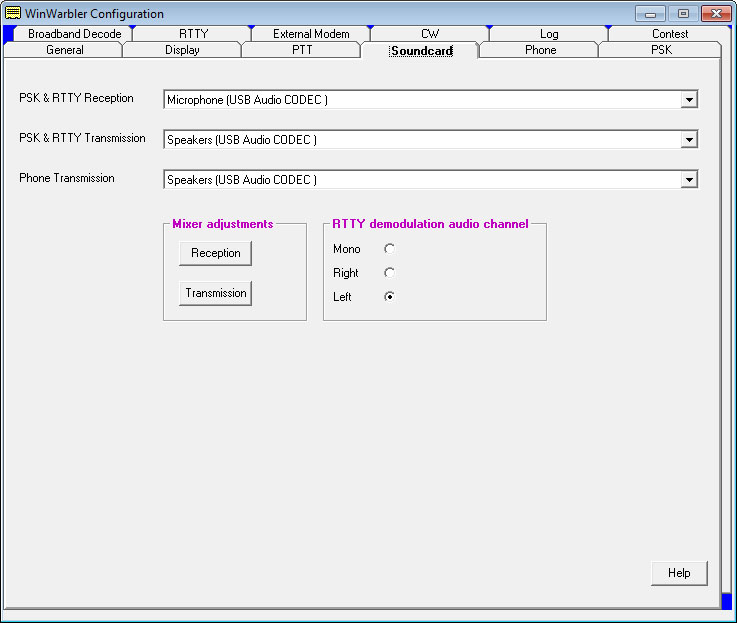
- in addition to the menu settings each model provides to control modulation level (playback volume) and received AF level (recording volumne), Windows also provides control over these levels:
to configure your IC-7100 to accept audio from the USB interface, decide whether your digital mode operation will employ Data MOD or not. Then open the transceiver's SET MODE menu and
set the Connectors (DATA OFF MOD) or Connectors (DATA MOD) to USB, as shown on page 1-18 of the IC-7100 Advanced Instruction Manual
set the Connectors (USB MOD Level) to 50% (you can increase or decrease this later to adjust the audio drive level)
set the Connectors (ACC/USB AF Level) to 50% (you can increase or decrease this later to adjust the density of the waterfall display)
to configure your IC-7200 to accept audio from the USB interface, decide whether your digital mode operation will employ Data MOD or not. Then open the transceiver's SET MODE menu and
set the Modulation input (Data OFF) or Modulation input (Data ON) to USB, as shown on page 77 of the IC-7200 Instruction Manual
set the USB Level to 50% (you can increase or decrease this later to adjust the density of the waterfall display)
to configure your IC-7300 or IC-7300MK2 to accept audio from the USB interface, decide whether your digital mode operation will employ Data MOD or not. Then open the transceiver's SET MODE menu and
set the DATA OFF MOD or DATA MOD to USB, as shown on page 12-8 of the IC-7300 Instruction Manual
set the USB MOD Level to 50% (you can increase or decrease this later to adjust the audio drive level)
set the ACC/USB AF Output Level to 33% (a level higher than that will cause WinWarbler to report Receive Soundcard Overload)
to configure your IC-7410 to accept audio from the USB interface, decide whether your digital mode operation will employ Data MOD or not. Then open the transceiver's SET MODE menu and
set the DATA OFF MOD or DATA MOD to USB, as shown on page 9 of the IC-7410 Instruction Manual
set the USB MOD Level to 50% (you can increase or decrease this later to adjust the audio drive level)
to configure your IC-7600 to accept audio from the USB interface, decide whether your digital mode operation will employ DATA 1 MOD (D1), DATA 2 MOD (D2), DATA 3 MOD (D3), or will be accomplished with DATA mode not in use. Then open the transceiver's ACC SET menu and
set the appropriate entry's signal source to USB, as shown on page 124 of the IC-7600 Instruction Manual
set the USB MOD level to 50% (you can increase or decrease this later to adjust the audio drive level)
to configure your IC-7610 to accept audio from the USB interface, decide whether your digital mode operation will employ DATA 1 MOD (D1), DATA 2 MOD (D2), DATA 3 MOD (D3), or will be accomplished with DATA mode not in use. Then open the transceiver's ACC SET menu and
set the appropriate entry's signal source to USB, as shown on page 8-6 of the IC-7610 Instruction Manual
set the USB MOD level to 50% (you can increase or decrease this later to adjust the audio drive level)
set the USB AF Output Level to 50% (you can increase or decrease this later to adjust the density of the waterfall display)
to configure your IC-7850/IC-7851 to accept audio from the USB interface, decide whether your digital mode operation will employ DATA 1 MOD (D1), DATA 2 MOD (D2), DATA 3 MOD (D3), or will be accomplished with DATA mode not in use. Then open the transceiver's ACC SET menu and
set the appropriate entry's signal source to USB, as shown on page 15-8 and 15-9 of the IC-7850/IC-7851 Instruction Manual
set the USB MOD level to 50% (you can increase or decrease this later to adjust the audio drive level)
set the USB AF Output Level to 50% (you can increase or decrease this later to adjust the density of the waterfall display)
to configure your IC-9100 to accept audio from the USB interface, decide whether your digital mode operation will employ Data MOD or not. Then open the transceiver's SET MODE menu and
set the DATA OFF MOD or DATA MOD to USB, as shown on page 167 of the IC-9100 Instruction Manual
set the USB MOD Level to 50% (you can increase or decrease this later to adjust the audio drive level)
to configure your IC-9700 to accept audio from the USB interface, decide whether your digital mode operation will employ Data MOD or not. Then open the transceiver's SET MODE menu and
set the DATA OFF MOD or DATA MOD to USB, as shown on page 8-12 of the IC-9700 Instruction Manual
set the USB MOD Level to 50% (you can increase or decrease this later to adjust the audio drive level)
Windows will alert you to various events by playing sounds on the soundcard designated as the default Windows soundcard. To prevent such sounds from being transmitted while you are operating in PSK, RTTY, or Phone, use a soundcard other than USB Audio CODEC to serve as the default Windows soundcard.