WinWarbler Online Help Contents
The RTTY and Soundcard tabs of WinWarbler's Configuration window provide control over the basic settings required to configure the MMTTY engine for RTTY operation. The MMTTY engine provides additional settings that govern
Configuring these settings is accomplished by clicking the MMTTY Setup button on the Configuration window's RTTY tab, which displays MMTTY's 6-tab Setup window; the settings adjustable via these tabs are fully described in the MMTTY help file; several of these settings are also described below.
To simplify the task of managing many settings, MMTTY provides profiles; a profile is a named group of settings. You can direct WinWarbler to save MMTTY's current settings to a profile, and later restore those settings by selecting that profile using the Profile Selector in the Main window's RTTY receive panel.
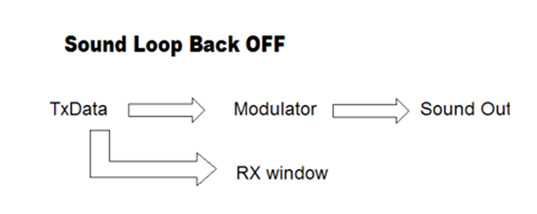
When the Sound loopback panel is set to OFF, MMTTY's demodulator is inactive. As characters are transmitted, they are displayed in RTTY Receive pane:
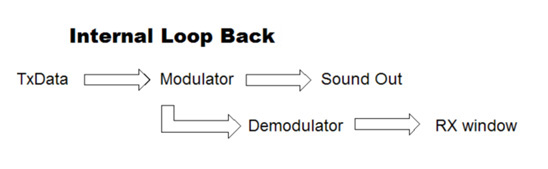
When the Sound loopback panel is set to Int., the RTTY Receive pane displays transmitted characters decoded from your transmitted AFSK signal, providing confidence that the Modulator is working correctly:
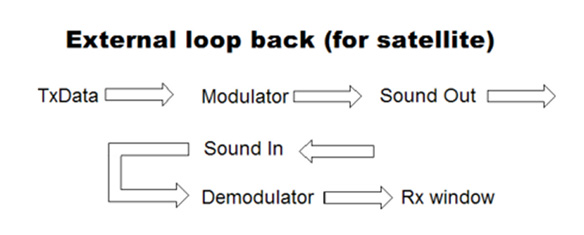
When the Sound loopback panel is set to Ext. (SAT), the RTTY Receive pane displays characters decoded from whatever signal is connected to your soundcard input. This can be used, for example, to display the received "echo" from a satellite you're working: